
Architectural Walkthrough Storyboards: Plan the Camera Before the Final Render
A walkthrough can contain a beautifully modeled building and still be difficult to follow. The camera arrives in a room before the viewer understands how it connects to the entrance, passes an important feature too quickly, then spends time on a space that does not answer the original brief. These are problems of sequence and communication. More polished materials will not, by themselves, fix them.
A storyboard gives the project team a way to discuss that sequence before treating it as finished footage. Review the camera journey as a communication decision: where the viewer begins, what each scene explains and how the sequence connects. Agree the preview format, review stages and revision allowance with your visualization partner before production starts.
What the Storyboard Is There to Decide
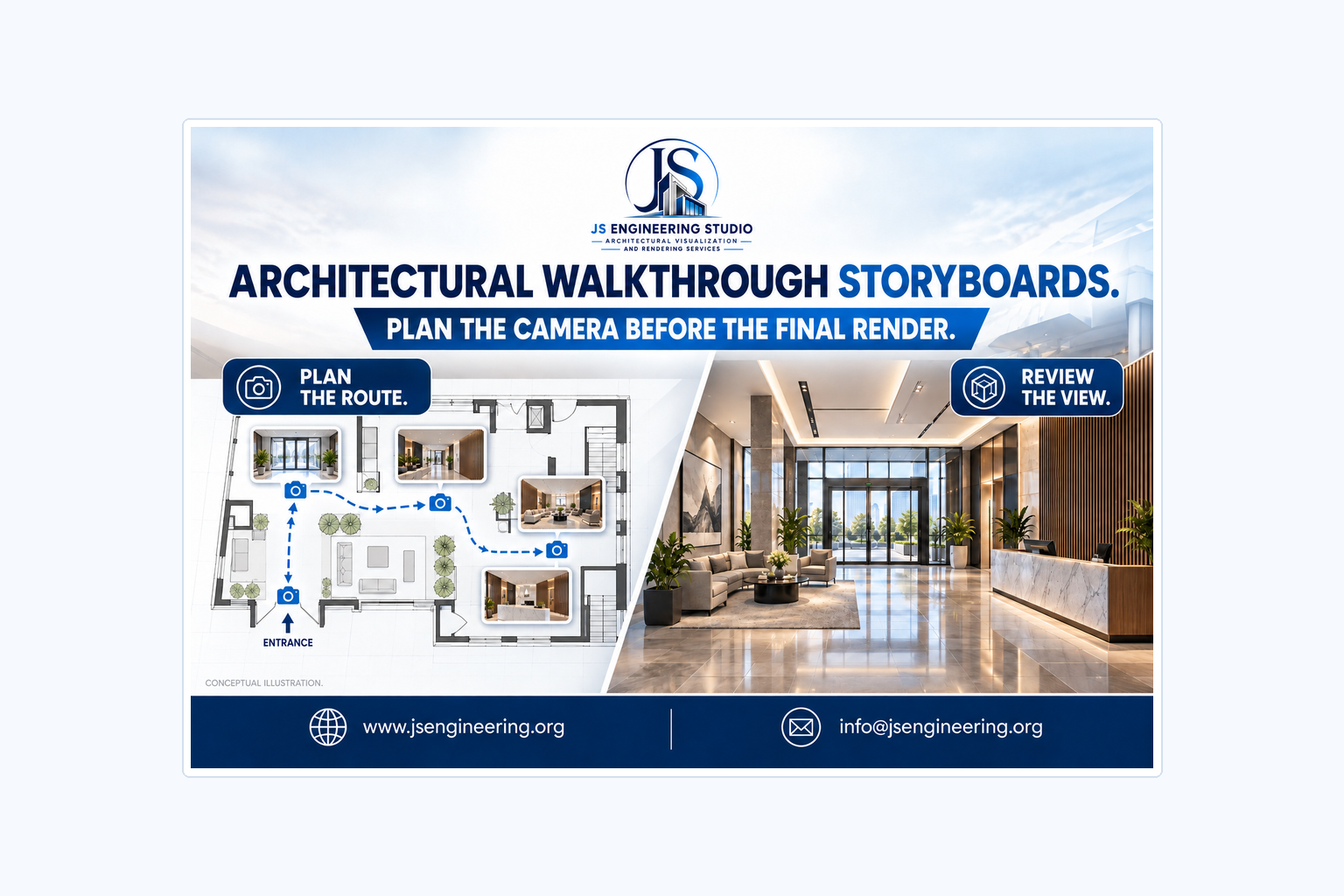
A storyboard is a planned sequence of views. It can explain where the presentation begins, what the audience sees next and what each scene contributes. The form can vary: drawings, reference frames, marked-up plans or another agreed preview. Ask the studio what it proposes for your project and what the preview is intended to help you approve.
The first question is the purpose of the journey. A film explaining arrival and circulation needs a different structure from one introducing a property concept or presenting an interior atmosphere. Define the audience and the decision before choosing an opening shot. Otherwise, the team may approve a sequence because it looks impressive without noticing that it leaves the intended question unanswered.
JS Engineering Studio lists architectural, interior and exterior walkthrough animation among its services. Its service page describes camera movement, lighting and visual storytelling as part of how it presents designs. Use that as a starting point for a project conversation, then confirm the actual scope, preview arrangements and deliverables in writing.
Start with a Route the Audience Can Understand
Mark the proposed route on a plan and give the scenes short names. Entrance approach, lobby orientation and shared-space reveal are more useful review labels than a series of unnamed clip numbers. These are examples, not a required sequence. Choose labels that make the connection between the plan and the presentation obvious to the people checking it.
Decide whether the journey should be continuous or whether separate scenes would be clearer. A continuous move can explain how spaces connect, but an unnecessary journey between distant locations can distract from the point of the presentation. A cut can move the story forward, provided the viewer has enough information to understand that the location has changed.
Do not let the route imply a connection that the design does not provide. If the camera appears to pass through a wall or move directly between separate areas, ask whether the presentation needs a transition, an orientation frame or another explanation. A cinematic shortcut should not quietly become a misleading account of the proposed layout.
The Difference Between a View List and a Storyboard
A view list identifies what to show. A storyboard also explores order and relationships. Living room, kitchen and balcony might describe three required spaces, but the list does not explain where the viewer starts, how the camera approaches them or why one follows another. A useful review makes those decisions visible.
Give each scene one primary job. It may establish location, explain a connection, reveal an important feature or show the relationship between several elements. If the team cannot agree on that job, the scene may be trying to do too much. Consider whether a still image or a separate detail view would answer part of the question more directly.
Also distinguish what the camera needs to reveal from what happens to be in the scene. A visible doorway may provide orientation, while the feature under review is a reception desk. Mark the feature that matters so the discussion does not drift into unrelated decoration before the route has been settled.
Review Framing Before Surface Detail
At an early camera review, concentrate on what the framing allows the viewer to understand. Can the audience see the intended connection? Is the important entrance hidden? Does a foreground object block the part of the design that the scene is meant to explain? Keep those questions separate from whether the final fabric or paint finish has been selected.
A simplified preview may be suitable for reviewing the route, but only if everyone understands its limits. Ask which elements are provisional and which reflect the current design. A missing texture in a camera preview is not necessarily an omission from the final scope. Conversely, a detailed-looking preview should not be assumed to settle a dimension or material unless the responsible team has checked it.
Avoid approving a lens or camera position solely because it makes the room look larger. Ask whether the view communicates the space in a way the project team is prepared to stand behind. The goal is an understandable presentation of the proposal, not an image that disguises an awkward relationship through framing.
Pace the Sequence Around Comprehension
There is no universal number of seconds that makes a room understandable. What the audience needs to notice matters more than an unsupported rule about ideal runtime. A scene introducing an unfamiliar arrangement may need a different treatment from a brief transition through a space already established in the presentation.
Review the sequence without relying on music to make it feel complete. Ask what the viewer is meant to notice at each moment and whether the movement gives that feature a clear place in the frame. If a point requires explanation from someone in the room, consider whether the visual order or supporting caption needs work.
Then consider how sound or text contributes. A caption can identify a proposed space or a change of location, but it should not compensate for a route that is hard to follow. Voice-over, music, subtitles and graphic titles are separate scope items to confirm. Record which of these items are included in your animation scope.
Use a Simple Review Example
Imagine a hypothetical office presentation whose purpose is to explain how visitors arrive and find a shared meeting area. One possible sequence starts with the approach, makes the entrance legible, establishes the lobby, then shows the connection to the meeting area. That route follows a question the audience can understand: where do I go next?
Now imagine that the same sequence starts inside the meeting room, jumps to an exterior view and returns to the lobby without explanation. The individual images may look good, but the relationship between them is harder to read. A storyboard review can identify that problem while the team is still discussing the sequence rather than reacting only to surface polish.
This is an invented planning example, not a JS Engineering client project or a claim about a particular building. Your actual sequence should reflect the supplied design and the purpose of the commission. A marketing introduction, a design discussion and a circulation explanation may legitimately use different routes through the same model.
Give Feedback That Identifies a Camera Decision
Write comments against a named scene or an agreed time reference. Describe the issue and the intended result: the entrance is hidden by the foreground planting; keep the approach readable. That is more actionable than make it more cinematic. Let the animation team propose how to achieve the result rather than prescribing a technical setting you do not need to control.
Separate a camera comment from a design change. Show more of the reception counter is a framing question. Move the reception counter to another wall changes what is being represented. The second instruction may affect geometry, the route and later scenes. Ask how a change will be assessed before assuming it falls within the same revision allowance.
Consolidate conflicting comments before sending them. If one reviewer wants the scene to explain circulation and another wants a close-up of a material, clarify the priority or request a separate view. The studio should not have to choose between incompatible instructions without knowing who can make that decision.
Know What a Preview Approval Does Not Settle
Approval of a route should describe what was reviewed. It might confirm the order of scenes and the intended framing while leaving materials, final lighting, audio or text for later review. Name those boundaries. A short written summary protects the meaning of the decision better than an unqualified looks good message.
A storyboard is not a construction document, an accessibility assessment or proof that a proposed route complies with a particular rule. Those questions belong with the relevant professionals and technical information. Keep the distinction clear when the film will be used beyond the internal design team.
If the design changes after the route is agreed, flag the affected scenes. A revised entrance, a relocated partition or a different furniture layout may change what the camera can explain. Ask the studio which parts of the sequence need review and whether the change affects the scope or schedule. Do not assume a finished sequence remains current simply because its file still plays.
Prepare the Final Uses Before Choosing the Cut
Tell the studio where the animation will be used: a presentation screen, a website or another agreed channel. Ask whether different versions are needed and how any alternate framing will be checked. A scene composed for one shape of frame may lose its main subject when cropped for another.
Keep captions and other important information away from areas likely to be obscured by a player interface. Confirm the intended outputs, labels and any additional versions in the scope rather than treating them as automatic extras. The final review should include the actual files the team plans to use, not only a preview embedded in a message.
Retain the agreed route, the design version and the final approved files together. That record helps a later reviewer understand what the film represents. It also makes it easier to explain a change request without reconstructing every decision from an old conversation.
Frequently Asked Questions
Do I need a storyboard for every architectural walkthrough?
Discuss the appropriate preview with the studio. The useful requirement is that the team can review the route and sequence before treating them as final. The format and included stages depend on the agreed project scope.
Is a storyboard the same as a finished animation?
No. It is a planning and review aid for the sequence. Ask which aspects it establishes and which remain provisional, such as materials, lighting, audio or final presentation.
How long should each scene last?
There is no universal duration in this guide. Review what the audience needs to understand, the complexity of the scene and its role in the sequence. Do not rely on an unsourced timing rule.
Can I change the camera after reviewing the preview?
Ask how camera changes are handled in your engagement. The effect can depend on what has already been produced and whether the request also changes the design or number of views. Confirm any scope and schedule consequences before proceeding.
Does the walkthrough include vertical social versions?
Not automatically. Specify the intended channels and ask which versions are included. Review alternate framing separately so important content is not cropped out.
How can I discuss a walkthrough with JS Engineering Studio?
Use the studio's official contact page. Share the purpose, drawings, proposed spaces and intended outputs, then ask the team to confirm a suitable scope, preview process and project-specific quotation.
Conclusion
A useful architectural walkthrough storyboard makes the journey understandable before final polish becomes the focus. Name the decision, map the route, give each scene a job and keep camera feedback separate from design changes. The result is a clearer basis for discussing what the finished animation should communicate.
Request a project quote from JS Engineering Studio: share your drawings, the audience, the spaces to show and your intended use. Confirm the route-review arrangements, deliverables and schedule for your project through the official contact page or info@jsengineering.org.